
Nostro
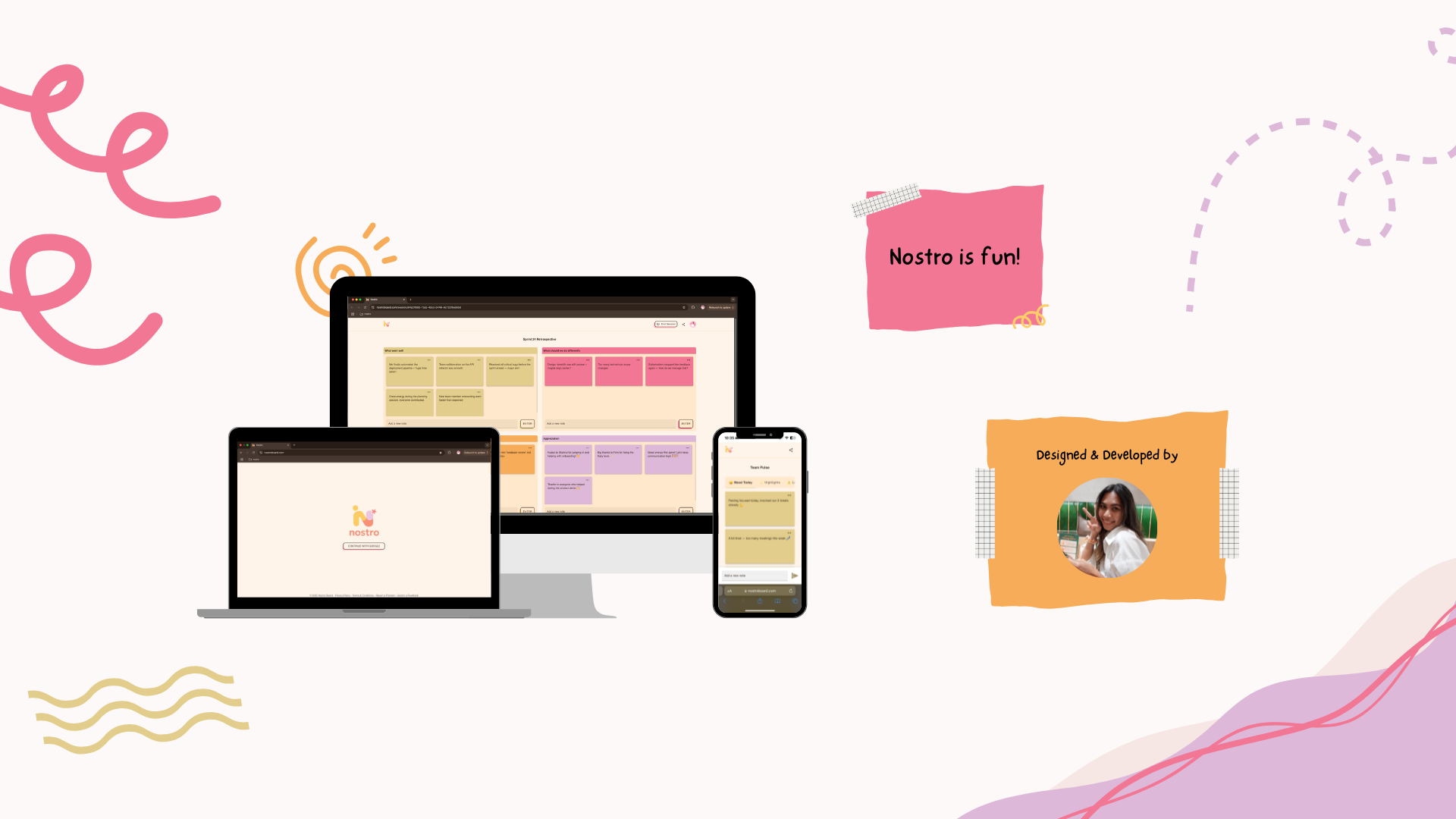
Nostro is a lightweight, real-time retrospective board designed and built to make team retros simple, structured, fun and fast — without the lag and clutter of tools like Miro or the limitations of FunRetro. And unlike many retro tools, Nostro is fully mobile-friendly, so teams can collaborate easily even when they’re not at their desks.
Role: UX Researcher, UX/UI Designer, Full-Stack Developer
Tools: Figma, React, Typescript, Vite, MUI, Elysia JS, Redis, PostgreSQL, BetterAuth (Google OAuth)
Duration: ~6 months
Background & Origin Story
One quiet afternoon at work, I was thinking about what project I could start for my portfolio. My team lead jokingly said: “Why don’t you build a retrospective board? The current free one we’re using is so laggy…” We had previously used FR, but it became paid, and M just was... okay, but I personally didn't like M. The boards were giant, scrolling was slow, and adding sticky notes was frustrating. Notes were scattered, sessions always felt messy, and collaborating was clunky. So the idea stuck with me: what if we could make retros simple, structured, joyful, and fast — even on mobile? And just like that (well, not really), Nostro was born.
Problem Space & Goals
Pain point I wanted to solve
- Laggy, clunky tools → Miro free version slows down with many notes
- Cluttered boards → one long canvas makes it hard to find the latest session
- Sticky notes frustration → adding and typing notes wasn’t smooth
- Disorganized retros → notes scattered across the board with no structure
- No session control → anyone could keep adding after a session ended, causing confusion
- Poor mobile usability → most tools are responsive but not truly designed for mobile
Goals
- Make retro collaboration fast and effortless
- Provide clear structure: → folders → sessions → items
- Ensure stable, reliable real-time syncing
- Make a joyful, friendly interface
- Design for mobile-first usability, not 'just responsive'
Success Metrics
- Add notes with minimal taps/clicks
- Smooth real-time updates without lag
- Sessions are properly saved and locked when ended
- Positive feedback from internal users compared to previous tools
- Retro is manageable and enjoyable on both desktop & mobile
Research
The competitive analysis and user interviews gave me a better understanding of who the users were and what they want. Teams don't want a massive workspace. They want speed, structure, and a clean, fun experience. And they especially want something that works well on mobile for quick async collaboration and on the go.
User Interviews
Interviewed 3 developers from 2 teams about their experience running retrospectives and my team leader.
- Scrum Masters / Team Leads → want smooth facilitation
- Developers / Team Members → want fast, frustration-free typing & voting
Competitive Analysis
Analyzing some of the most popular retrospective tools to identify gaps in speed, real-time sync, and session usability.
- Miro → giant canvas, feels heavy
- FunRetro → simple but paid now
- Parabol → too complex for quick retros
UX Design
wireframe
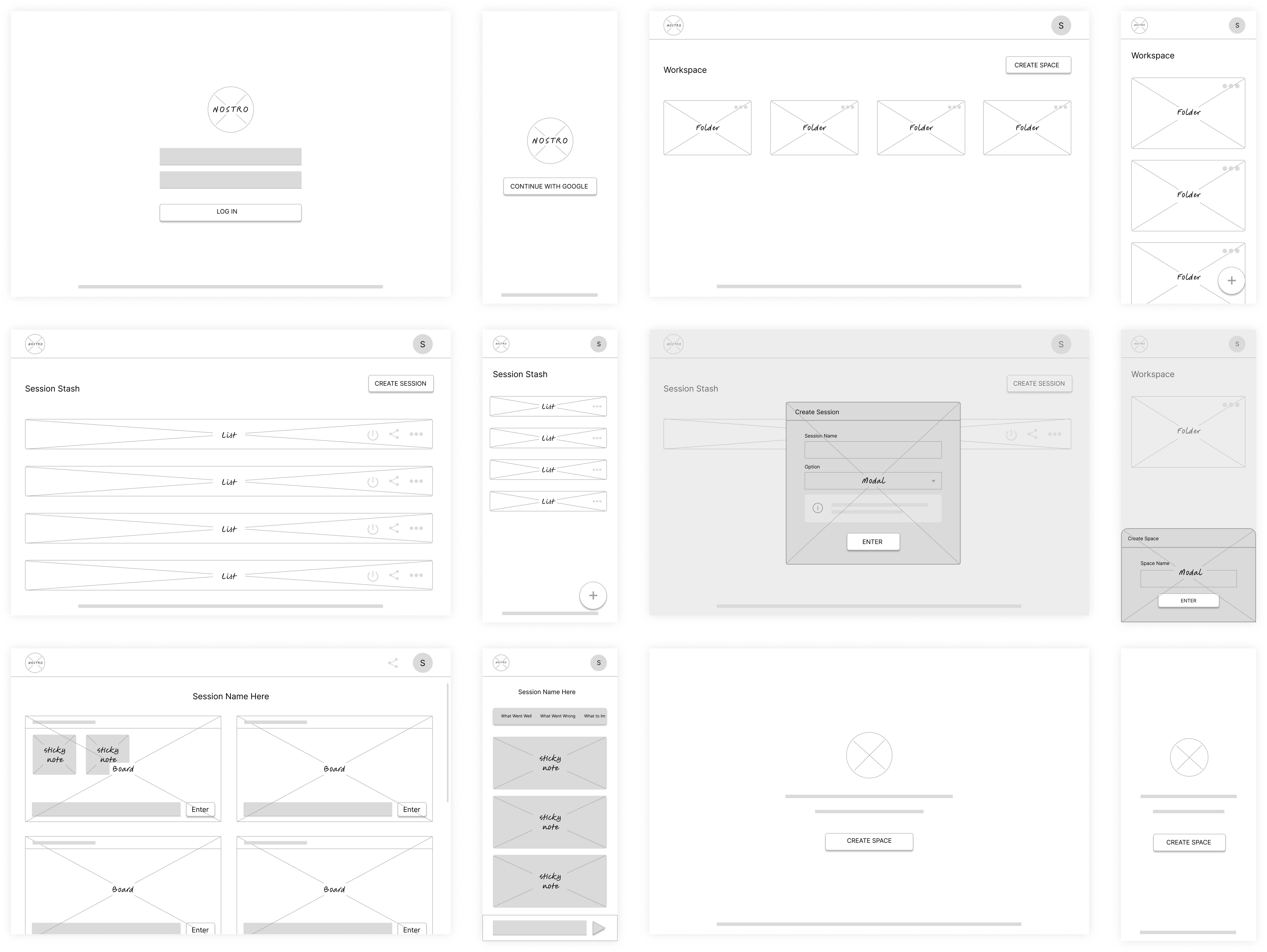
I sketched a full set of low-fidelity wireframes covering both desktop and mobile views. These include five core screens: Login, Workspace, Session Stash, Session Room, and Empty State. The goal was to explore navigation clarity, simplify the multi-level structure, and ensure both form-first and mobile-first flows feel effortless.
key Decisions
- Use a Workspace → Folder structure so users can organise sessions by project.
- Design folders to look familiar, like desktop file folders.
- Keep all sessions in a Session Stash so users can easily revisit past retros.
- Allow ending a session to lock it as read-only for future reference.
- Use type-to-create sticky notes for faster input (no dragging or clicking).
- Show four boards clearly on desktop for easy comparison.
- Use tabs on mobile to avoid cramped grids so each board stays clean and readable.
- Let users share the session link so anyone can join instantly.
- Show clear empty states to guide first-time users.
information Architecture
- Workspace → Folder → Session → Category → Note
- Clear hierarchy prevents the 'giant canvas problem' and keeps collaboration structured
UI Design
look And Feel
Bright, friendly, and joyful — but clean enough for work
Development & Implementation
Frontend: React + TypeScript + Vite + MUI
Backend: Elysia JS + WebSocket
Database: PostgreSQL
Caching: Redis
Authentication: Google OAuth (BetterAuth)
Monorepo: Turborepo
Package Manager: Bun
Libraries: Zod + TanStack Query + React Hook Form
Quality: SonarQube
Devops: Docker + CircleCI + Dokploy + Hetzner + Cloudflare
Challenges
- Initial backend reset during alpha testing caused data loss before saving session → led to Redis integration.
- Original username/password login requested to be replaced with Google OAuth.
- User requested ability to edit notes, customize board names, and end session from session room.
Solution
- Integrated Redis to prevent session data loss on server restart.
- Implemented Google OAuth for simpler login and authorization.
- Enabled editing notes, customizing board names, and ending sessions from session room.
- Created public session URLs with copy link button for easy team collaboration.
- Automated session end after 2 hours if owner forgot to end session.
Testing & Iteration
Alpha Testing
focused on login, dashboard flow, folder/session creation, and session room interactions. Feedback led to Redis caching, Google OAuth login, board customization, and note editing.
Usability Testing
feedback mostly about UI and additional features. Planned future improvements include voting/reaction on sticky notes, color changes, draggable stickies, and export to Excel.
Production
Production deployment (phase 1) now live with all alpha requested features implemented. Beta requests will be implemented in Phase 2.
Final Product
Nostro delivers:
- Fast real-time collaboration
- Clean folder/session structure
- Fun, friendly UI
- Locked sessions for clarity
- Smooth mobile & desktop experience
Impact & Results
- My team successfully switched from Miro to Nostro
- Sessions are more organized — no more messy boards
- Data reliability increased thanks to Redis
- Users loved the “type to create notes” experience
- Highlighted my hybrid superpower: UX thinking, UI design, Full-stack development, Real-time architecture
Project Takeaways
- UI/UX is more than visuals — it’s problem solving
- Real-time apps require careful design & backend logic
- Mobile-first design makes collaboration flexible & modern
- Simplicity wins over complexity
- Validating with real users produces the most meaningful improvements
Conclusion
Nostro turned into my little playground where I got to be the designer, developer, researcher, DevOps, and tester all at once. It’s not just a board; it’s a slice of my brain in pixels and code. I learned how to make something that actually feels good to use, works without throwing tantrums (me), and even makes teams smile (because they definitely tried to trick me into adding weird stuff!). Big shoutout to everyone who made this possible: Shahrul, for the idea and funding this madness all the way; Naqib, for suggestions, architecture guidance, and saving my backend and deployment sanity; and everyone else who cheered me on, endlessly. Hands down one of my proudest projects — and just the beginning. Phase 2, 3, and beyond are calling, and I’m ready to make them even more fun, powerful, and awesome.